
Google Search Console has a report called Crawl Stats that I’d never really looked at until this summer. On the community radio station website I run (about 32,000 posts), one line in it stood out: “Syndication”. That’s feeds, and it was about 30% of everything Googlebot asked for. Not pages, not images – RSS feeds! Nobody reads the feed of one presenter’s archive, but Google was fetching them all day long.
This is how I stopped it, what I left alone, and what I’ve actually checked so far.
Why WordPress has so many feeds
WordPress quietly makes a feed for almost everything: the whole site, every category, every tag, every author, all comments on the site, and the comments on every single post. Stick /feed/ on the end of nearly any WordPress URL and you’ll get one. On a site with 32,000 posts that’s a LOT of URLs, and Googlebot will happily work through them.
My crawl report for the 90 days to 29 September 2026 showed 218,000 requests, with an average response time of 408ms. Around 30% of those were feeds. (Syndication roughly doubled around 11 August and I never found out why.)
Why you can’t just noindex a feed
A normal page can say noindex in its head. A feed is XML with no head, so there’s nowhere to put the tag. It just keeps answering 200 OK for ever, and Googlebot keeps coming back. My author archive pages were already noindexed and Googlebot was still fetching the author feeds, which tells you how well that worked.
What I did: return 410 Gone
On 15 September 2026 I made the unwanted feeds answer with a 410 Gone, which means “removed on purpose”. This goes in the theme’s functions.php (13 lines):
add_action('template_redirect', function () {
    if (!is_feed()) {
        return;
    }
    if (is_author() || is_category() || is_tag() || is_singular()) {
        status_header(410);
        nocache_headers();
        header('Content-Type: text/plain; charset=utf-8');
        echo 'Gone';
        exit;
    }
}, 1);

// Stop advertising the extra feed links in the page head
remove_action('wp_head', 'feed_links_extra', 3);
It only does anything on a feed request. If that feed belongs to an author, a category or a tag, it answers 410 and stops. The is_singular() bit catches the comments feed of a single post, because that’s a feed for one post. Priority 1 makes it run before WordPress starts building the feed. The last line stops WordPress adding extra feed links to the head of every page, so Google isn’t being invited back.
Why 410 and not 404? Google says it treats the two very similarly, so I don’t want to oversell this. I picked 410 because it says “gone” rather than “not found” and costs nothing extra. I also didn’t block the feeds in robots.txt, because a URL that Googlebot isn’t allowed to fetch is one where it never gets to see the 410.
What I left working
The main feed at /feed/ is untouched, in case anything outside the site still relies on it, and so is /feed/atom/. The site-wide comments feed at /comments/feed/ still returns 200 too, because my code doesn’t catch it. I can’t imagine anyone subscribes to that either, but it’s still there.
Did it work?
I tested on 10 October 2026 with curl, using a real author, category, tag and post from the site (guessing URLs gave me 404s first, which isn’t the same thing!). All four unwanted feeds came back 410 and the three I left alone came back 200:
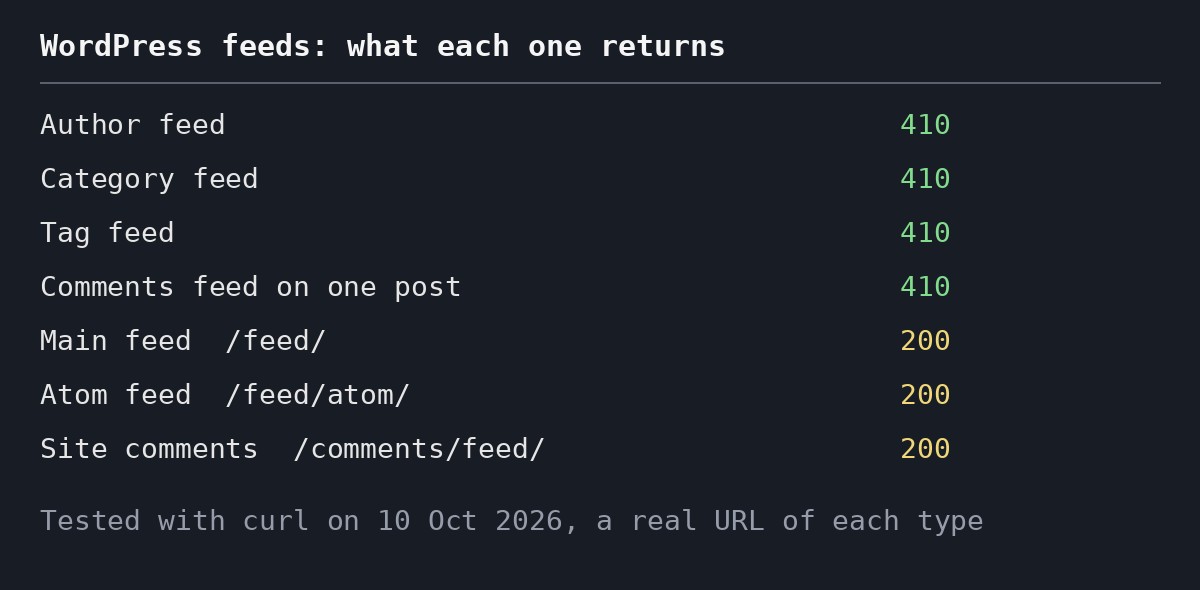
I also looked at the head of a post page. There are no RSS or Atom link tags in it any more, only the oEmbed and JSON ones that WordPress adds anyway.
The honest bit is that Search Console can’t confirm it yet. The report I looked at ended on 29 September, only 14 days after the change, and it has no separate row for 410s (4XX, 5XX and DNS errors were all under 1%). The feed share was still showing 30% because most of those 90 days were from before the fix. So I know the server is doing the right thing, but I don’t yet know whether Googlebot has noticed.
That’s 13 lines of PHP and, as far as I can tell, no feeds I’ll miss. The only person who might notice is whoever subscribed to the comments on one Friday night playlist.
Written 10 October 2026. I’m checking Crawl Stats again on 1 November and will add what I find here.